Resume & ATS
Optimize your resume for ATS – with keywords you can back up
Pathly matches your resume against the job posting, shows you missing terms and suggests wording. You see every change on its own and decide whether it goes into your resume.
Start free · No credit card required · Hosted in the EU
What an ATS does with your resume
An applicant tracking system (ATS) reads your document, assigns content to fields such as experience, education and skills, and stores it. Recruiters search and filter there for terms from the job posting; some systems rank matches by fit.
Whether your resume is rejected automatically depends on the company and the system. What is certain: if the system cannot read your document cleanly or the terms from the posting are missing, you are harder to find. You can do something about that.
What Pathly does for your resume
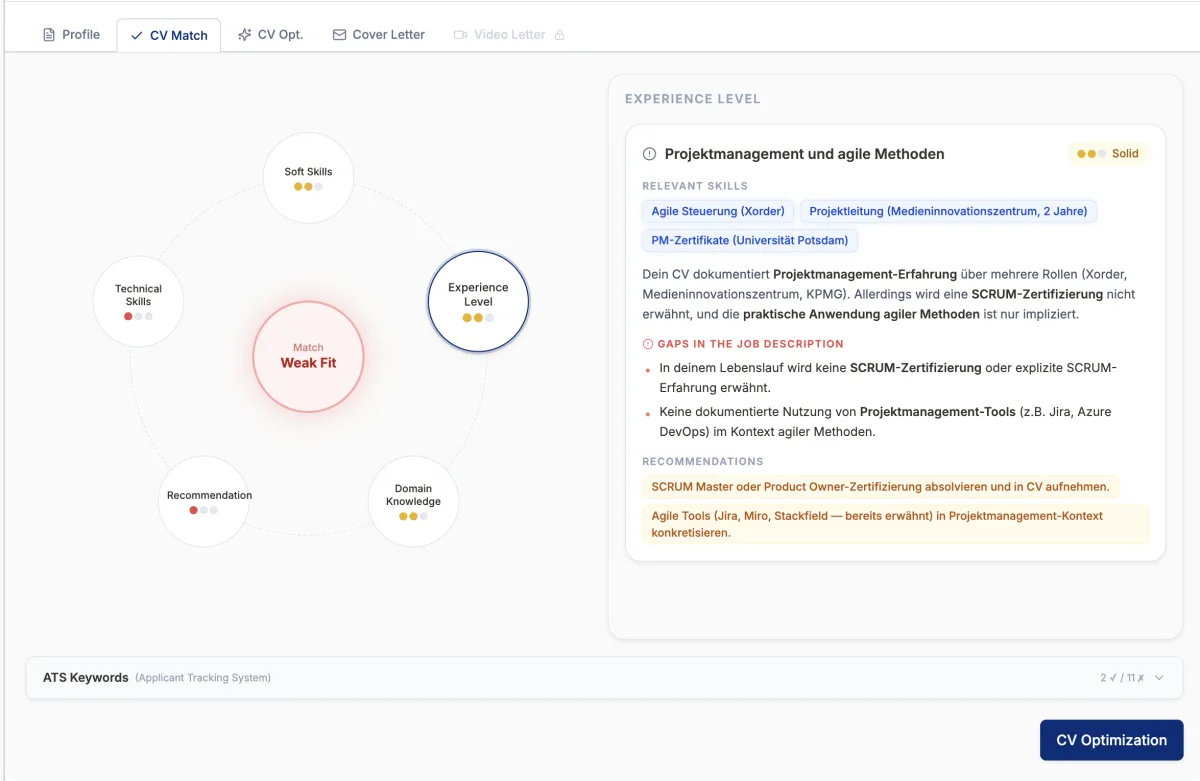
Match against the job
You see how well your profile fits the posting and where the gaps are. Honest, not rounded up.
ATS keyword check
Pathly lists the important terms of the posting and marks which ones already appear in your resume and which are missing.
Changes you accept or reject
Suggestions appear as before/after. You keep what is true and reject what does not fit you.
A readable template
A plain, ATS-readable template with clear headings. Optionally as a one-page version.
How the optimization works
Upload your resume
You upload your resume as a PDF. Pathly reads stations, education and skills in a structured way.
Add the job
By link, text or Chrome extension. The posting becomes tasks, requirements and keywords.
Review the match
You see fit, gaps and the keyword list with “found” and “missing”.
Check the changes
Go through the suggestions one by one. You can also edit text directly in the editor.
Download as PDF
Your optimized resume is ready as a PDF, optionally with a cover page or as a one-page version.
An ATS-friendly resume: the key rules
These rules help with every system and are easy for humans to read as well.
- One column, clear order: experience, education, skills.
- Standard headings such as “Experience” or “Education” instead of creative titles.
- Important content as text, not in tables, text boxes, graphics or skill bars.
- Consistent date format, for example 03.2022 – 08.2025.
- Write job titles and tools as they appear in the posting, if it is true.
- Spell out abbreviations once: “Search Engine Optimization (SEO)”.
- Save as a PDF with real text, not as a scan or image.
Resume and cover letter have to match
If your resume says “project lead” and your cover letter says “process ownership”, you look unclear. Pathly uses the same data basis for both: your stations and the profile of the job.
The next step follows naturally: the cover letter generator, which builds on the same evidence.
Frequently asked questions about ATS optimization
How many keywords should I include?
As many as the posting actually asks for and you can back up. A long keyword list without context does not help: humans read along in the end and spot it immediately.
Does an ATS resume have to look boring?
No. ATS-friendly means cleanly structured and without graphics for core information. That is also more pleasant for recruiters to read.
Which file format is right?
Usually a PDF with real text. Follow the instructions in the posting or the application portal.
Is my resume changed automatically?
No. Every change appears as a suggestion. You accept or reject it and can edit text yourself.
Can Pathly translate my resume?
Pathly can output resume and suggestions in the target language: German, English or Spanish. Still check technical terms yourself.
Is the resume optimization free?
You can start Pathly for free. The free plan includes four applications per month.
Related
- Cover letter generatorCover letters with company research and your own writing style. You review every sentence.Learn more →
- Chrome extensionSave jobs from LinkedIn, StepStone and career pages to your queue with one click.Learn more →
- Interview coachingMock interview for the specific job with feedback on your answers.Learn more →
- Find ATS keywordsStep by step: pull terms from the posting and use them honestly in your resume.Learn more →
- Automate job applicationsWhat is worth automating, and where you should decide.Learn more →
Try it with your next application.
Start for free. You decide at every step, the AI assists.